
Week 8: In-Class#
Demo#
Demo 8.1: Phonebook Merge#
A phonebook is represented as a dictionary where each key is a contact’s name, and the corresponding value is a list of phone numbers associated with that contact. As an example, consider the two phonebooks given below:
phonebook = {'Liv': ['55511112', '18777890'],
             'Mads': ['27274445', '48533336'],
             'Steve': ['45455555', '25455525']}

second_phonebook = {'Anna': ['89577772'],
                    'Steve': ['25257755', '25455525'],
                    'Mads': ['48533336', '27274445']}
Given a second phonebook, we want to add its content to the first phonebook, but without creating duplicates. Specifically:
If a name from the second phonebook is not present in the first phonebook, it should be added to the first phonebook along with its associated phone numbers.
If a name from the second phonebook is already present in the first phonebook, then we look at the two lists of phone numbers for that name. Phone numbers that are only present in the second list should be added to the end of the first list in the order they occur in the second list.
Pen & Paper
Make a test for the function you are going to write. Using the two phonebooks above, write down what the expected value of phonebook should be after adding the second phonebook.
Demo
Write a function that takes two dictionaries representing phonebooks as input. The function should not have a return statement, but it should modify the first phonebook by adding the content from the second phonebook.
The expected behavior of the function is shown below:
>>> phonebook_merge(phonebook, second_phonebook)
>>> phonebook
{'Liv': ['55511112', '18777890'],
 'Mads': ['27274445', '48533336'],
 'Steve': ['45455555', '25455525', '25257755'],
 'Anna': ['89577772']}
The filename and requirements are in the box below:
phonebook_merge.py
phonebook_merge(phonebook, second_phonebook)
Modifies the dictionary phonebook by adding the content from second_phonebook while avoiding duplicates.
Parameters:
|
|
A dictionary containing names and lists of phone numbers. |
|
|
A second dictionary containing names and lists of phone numbers. |
Use the following script to check your function test_phonebook_merge.py.
Coding Practice#
Code 8.2: Inventory Management#
The dictionary below represents the inventory of a store, where each key of the dictionary is a string naming an item, for instance 'apples', and each value is the quantity of that item in the store.
inventory = {
    "apples": 10,
    "bananas": 5,
    "oranges": 8,
    "kiwis": 7
}
Write a function restock_inventory that takes as input a dictionary with the same structure as inventory and an integer representing how many units to add to each item. The function should increase the quantity of each item in the inventory by the given restock amount and then return the updated dictionary.
The expected output of restock_inventory is shown below:
>>> inventory = {
...     "apples": 10,
...     "bananas": 5,
...     "oranges": 8,
...     "kiwis": 7
... }
>>> restock_inventory(inventory, 3)
{'apples': 13, 'bananas': 8, 'oranges': 11, 'kiwis': 10}
>>> restock_inventory(inventory, 2)
{'apples': 15, 'bananas': 10, 'oranges': 13, 'kiwis': 12}
>>> restock_inventory(inventory, 1)
{'apples': 16, 'bananas': 11, 'oranges': 14, 'kiwis': 13}
Code 8.3: Weather Station#
Create a dictionary which represents a weather station. The dictionary should have 5 keys: "station_name", "is_operational", "city", "country" and "construction_year". You can see the value of each key in the image below.
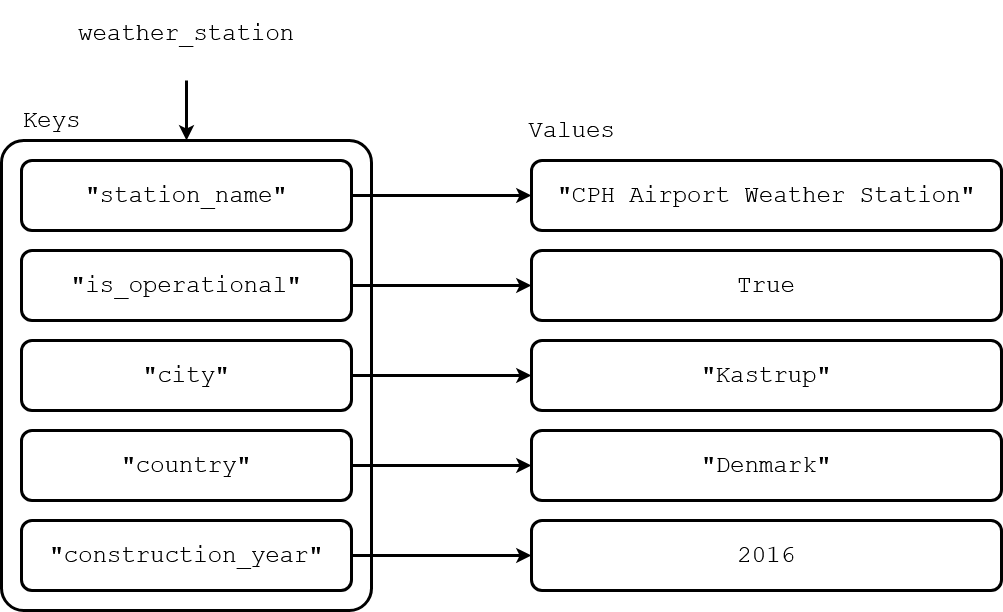
Now modify the dictionary by adding the key "temperature_readings" with the value [20.1, 21.3, 19.8, 22.0]. Also add the key "wind_speed_readings" with the value [5.2, 3.4, 7.1, 15.6].
Write a for-loop that prints all key-value pairs of the dictionary weather_station. Look at your output and confirm that the dictionary has the correct keys and values.
Now write a function get_average_readings which takes as input a dictionary with the same structure as weather_station. The function should return a tuple with two values: the average of the wind speed readings and the average of the temperature readings. Test the function with the dictionary weather_station and print the results.
Code 8.4: Data Statistics#
Write a function data_statistics which, given a list of experiment values and an experiment name, returns a dictionary containing the following key-value pairs:
"experiment_name": The name of the experiment."experiment_values": The list of experiment values."mean_val": The mean of the experiment values."standard_deviation": The standard deviation of the experiment values."max_val": The maximum of the experiment values."min_val": The minimum of the experiment values.
The standard deviation \(\sigma\) of a sequence of values can be found using the formula below:
where \(x_{i}\) denotes value \(i\) in the sequence, \(\mu\) is the mean of the sequence and \(N\) is the length of the sequence.
To test your function, you can use the example data given below:
experiment_name = "standard_values"
experiment_values = [1.30, -0.01,  1.35,  0.31,  0.35, -1.61,  1.39,  1.19, -1.07,  0.34]
Problem Solving#
Problem 8.5: Energy Expenditure#
Energy expenditure is a measure of how many calories a body burns throughout a day. Total energy expenditure (TEE) can be calculated as
where AF is the activity factor, and BEE is the basal energy expenditure covering essential functions like breathing, circulation, and digestion.
The BEE for males and females is
where weight, height and age are in kilograms, centimeters and years, respectively.
The activity factor AF depends on the activity level:
Sedentary activity: \(\mathrm{AF} = 1.3\)
Moderate activity: \(\mathrm{AF} = 1.5\)
Strenuous activity: \(\mathrm{AF} = 2.0\)
Assume you are given data for three people in the following form:
person_data = {
    "names": ["Jakob", "Josefine", "Morten"],
    "genders": ["Male", "Female", "Male"],
    "ages": [25, 30, 37],
    "weights": [70, 60, 86],
    "heights": [175, 165, 189],
    "activity_levels": ["moderate", "strenuous", "sedentary"]
}
Here, the items in the first position of each list correspond to the first person, and so on.
Write a function which meets the following specifications:
calculate_bee_tee.py
calculate_bee_tee(person_data, name)
Calculates the basal energy expenditure (BEE) and total energy expenditure (TEE) of a person.
Parameters:
|
|
Person data including name, gender, age, weight, height and activity level |
|
|
The name of a person in |
Returns:
|
The BEE and TEE of the person with the corresponding name |
The expected output of the function is shown below:
>>> calculate_bee_tee(person_data, 'Jakob')
(1730.0, 2595.0)
>>> calculate_bee_tee(person_data, 'Josefine')
(1387.0, 2774.0)
>>> calculate_bee_tee(person_data, 'Morten')
(1937.6, 2518.88)
Problem 8.6: Player Scores#
You are in charge of making a leaderboard for DTU’s football club. You have devised a point scoring system to determine the performance of each player. The point scoring system is as follows:
Successful goals are worth 20 points each
Successful passes are worth 2 points each
Unsuccessful goals are worth 5 points each
Unsuccessful passes are worth 1 point each
Each player’s score is the sum of the points accumulated in the four categories.
Assume you are given the following set of player statistics containing the number of goals, number of passes, total number of goal attempts and total number of pass attempts for all the players in the club. The number of goal/pass attempts is the sum of the successful and unsuccessful goals/passes.
player_stats = [
    {"name": "Bob", "goals": 2, "passes": 15, "goal_attempts": 3, "pass_attempts": 17},
    {"name": "Alex", "goals": 1, "passes": 17, "goal_attempts": 2, "pass_attempts": 20},
    {"name": "Molly", "goals": 1, "passes": 28, "goal_attempts": 2, "pass_attempts": 31},
    {"name": "Sophia", "goals": 2, "passes": 21, "goal_attempts": 3, "pass_attempts": 25}
]
Write a function which meets the following specifications:
get_highscore.py
get_highscore(player_stats)
Finds the player with the highest score from a set of player statistics.
Parameters:
|
|
A list of dictionaries, one per player, with statistics including player name, number of goals, number of passes, number of goal attempts and number of pass attempts. |
Returns:
|
The name of the highest-scoring player and their player score. |
The expected output of the function is shown below:
>>> get_highscore(player_stats)
('Sophia', 91)